←Back
←Back
Writing Analytics Tool
Design Writing Tasks. Drive Growth. Save Time.

Manage your class, design tasks and rubrics, and provide feedback alongside WAT’s automated insights.

Sign Up

Whether you’re a teacher or student, WAT helps you learn more about your own writing—and how to improve it purposefully.

From Assignment to Submission, All Made Effortless

Learn About Your Writing with WAT
Reflect And Revise

WAT analyzes student writing using natural language processing and gives feedback on features like development of ideas, sentence variety, writing style, and vocabulary. Instead of a simple score, students get suggestions tied to purpose, audience, and revision strategies—so they can improve with each draft.

Teacher Tools

Teachers can create and assign writing tasks, attach rubrics, and manage multiple classes in one dashboard. WAT shows real-time analytics for each student and class, helping teachers identify common strengths and needs. Teachers can also view revision history, leave comments, and use the data to support one-on-one conferences or targeted mini-lessons.

Progress Through Practice

WAT encourages multiple rounds of revision, helping students understand that good writing is a process. Each submission builds on the last, with updated feedback and a holistic quality score. Over time, students and teachers can track growth and celebrate improvement—not just final grades.

FAQ?
Contact Us

Have questions or need support?

Please use our Contact Us form on the LEI website. We’ll get back to you as soon as possible.

Interested in using WAT for research?

Explore our tools and documentation for the WAT Researcher.

This work is supported by the Institute of Education Sciences (IES), U.S. Department of Education, (Award# R305A180261). Learn more about the grant on the IES Project Page.

© 2025 WAT. All Rights Reserved.

Writing Analytics Tool
Design Writing Tasks. Drive Growth. Save Time.

Manage your class, design tasks and rubrics, and provide feedback alongside WAT’s automated insights.

Sign Up

Whether you’re a teacher or student, WAT helps you learn more about your own writing—and how to improve it purposefully.

From Assignment to Submission, All Made Effortless

Learn About Your Writing with WAT
Reflect And Revise

WAT analyzes student writing using natural language processing and gives feedback on features like development of ideas, sentence variety, writing style, and vocabulary. Instead of a simple score, students get suggestions tied to purpose, audience, and revision strategies—so they can improve with each draft.

Teacher Tools

Teachers can create and assign writing tasks, attach rubrics, and manage multiple classes in one dashboard. WAT shows real-time analytics for each student and class, helping teachers identify common strengths and needs. Teachers can also view revision history, leave comments, and use the data to support one-on-one conferences or targeted mini-lessons.

Progress Through Practice

WAT encourages multiple rounds of revision, helping students understand that good writing is a process. Each submission builds on the last, with updated feedback and a holistic quality score. Over time, students and teachers can track growth and celebrate improvement—not just final grades.

FAQ?
Contact Us

Have questions or need support?

Please use our Contact Us form on the LEI website. We’ll get back to you as soon as possible.

Interested in using WAT for research?

Explore our tools and documentation for the WAT Researcher.

This work is supported by the Institute of Education Sciences (IES), U.S. Department of Education, (Award# R305A180261). Learn more about the grant on the IES Project Page.

© 2025 WAT. All Rights Reserved.

Writing Analytics Tool
Design Writing Tasks. Drive Growth. Save Time.

Manage your class, design tasks and rubrics, and provide feedback alongside WAT’s automated insights.

Sign Up

Whether you’re a teacher or student, WAT helps you learn more about your own writing—and how to improve it purposefully.

From Assignment to Submission, All Made Effortless

Learn About Your Writing with WAT
Reflect And Revise

WAT analyzes student writing using natural language processing and gives feedback on features like development of ideas, sentence variety, writing style, and vocabulary. Instead of a simple score, students get suggestions tied to purpose, audience, and revision strategies—so they can improve with each draft.

Teacher Tools

Teachers can create and assign writing tasks, attach rubrics, and manage multiple classes in one dashboard. WAT shows real-time analytics for each student and class, helping teachers identify common strengths and needs. Teachers can also view revision history, leave comments, and use the data to support one-on-one conferences or targeted mini-lessons.

Progress Through Practice

WAT encourages multiple rounds of revision, helping students understand that good writing is a process. Each submission builds on the last, with updated feedback and a holistic quality score. Over time, students and teachers can track growth and celebrate improvement—not just final grades.

FAQ?
Contact Us

Have questions or need support?

Please use our Contact Us form on the LEI website. We’ll get back to you as soon as possible.

Interested in using WAT for research?

Explore our tools and documentation for the WAT Researcher.

This work is supported by the Institute of Education Sciences (IES), U.S. Department of Education, (Award# R305A180261). Learn more about the grant on the IES Project Page.

© 2025 WAT. All Rights Reserved.

Landing page · ASU

ASU Learning Engineering Institute

WAT Landing Page

WAT, the Writing Analytics Tool, is built for teachers and students. I designed its public landing page so every section answers a stakeholder requirement, and the layout adapts to every screen size.

TEAM

Me, a project manager, a software engineer

TIMELINE

Jun 2025

TOOLS

Figma · FigJam
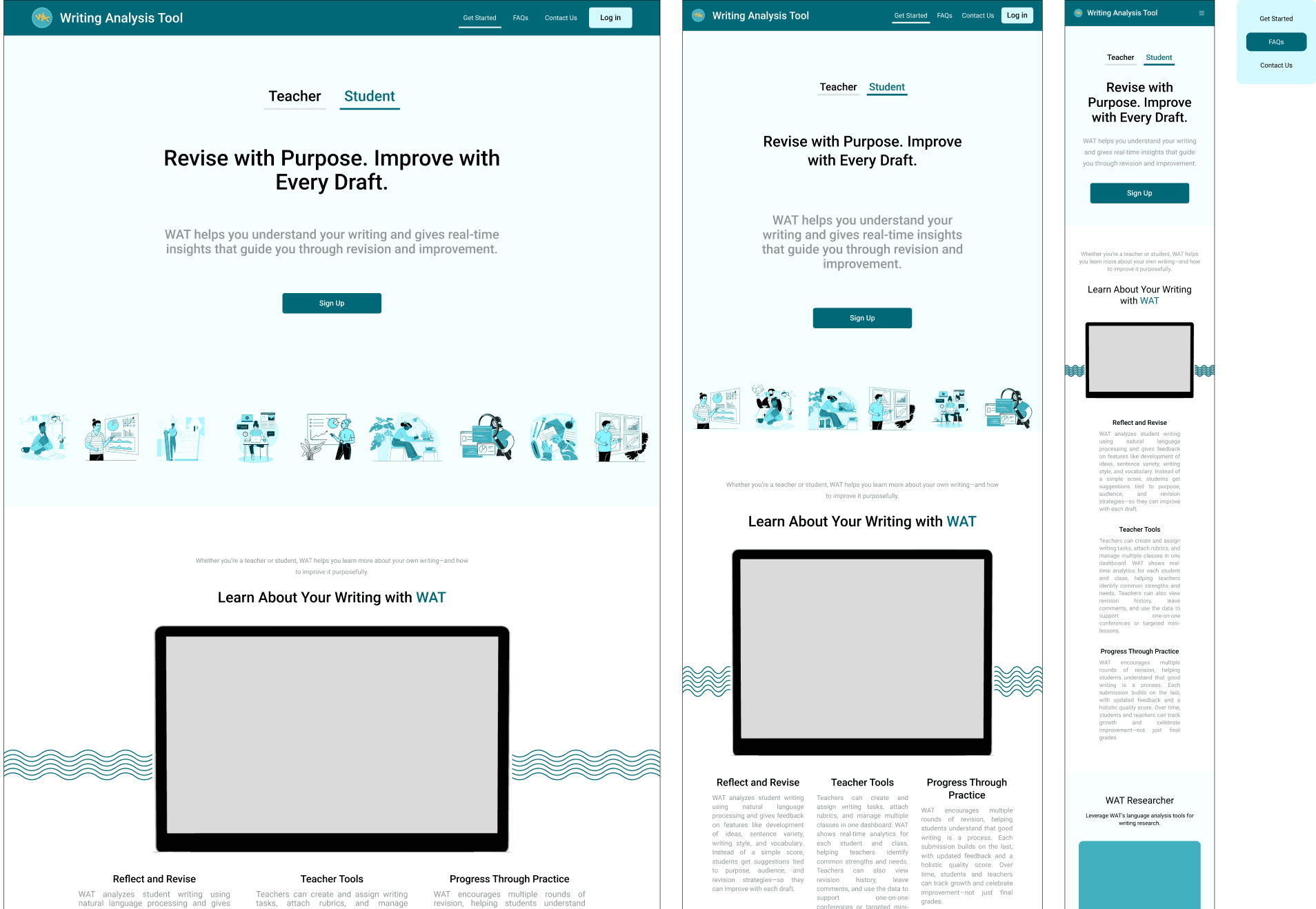
WAT landing page on desktop, tablet and phone, with the phone menu open

Figure 1. The page on desktop and tablet beside the phone layout with its menu open, with a gray placeholder where the product video goes.

The brief.

The team needed a landing page that explains the product. Stakeholders asked for brand presence through the tool’s own color guide, a clear call to action across the page, and a layout that holds up on tablet and phone.

I owned the design work. That covered the information architecture and section strategy first, then a style guide, then high-fidelity responsive screens and the developer handoff. My goal was a page where every section has one clear purpose and asks for as little reading as possible.

One hero, two audiences.

Stakeholders wanted the hero to speak to teachers and students, keep a single clear call to action and show the product’s value in one screen. I used two tabs, Teacher and Student, each with its own headline and one-line subhead, and the same Sign Up button under both.

I explored several hero layouts before settling on the tabbed version. On phones the tabs sit above a single headline and the Sign Up button.
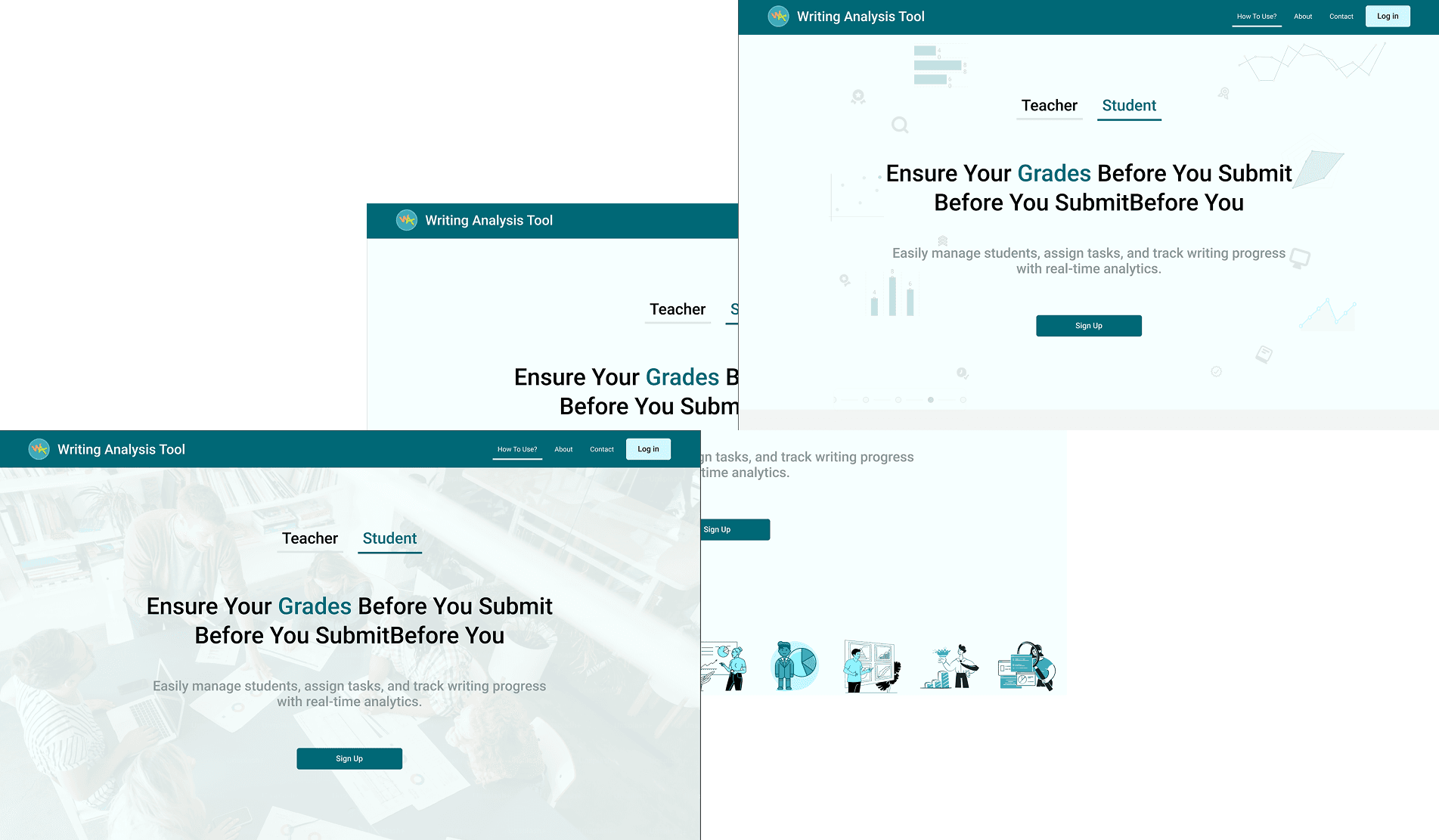
Hero explorations with the Teacher and Student tabs

Figure 2. Hero explorations with the Teacher and Student tabs.

Section by section.

The design file records each section’s stakeholder requirement, my design choice and the iterations behind it.

Navbar

A compact bar with the logo, anchor links to Get Started, FAQs and Contact Us, and the primary action on the right. On phones it collapses into a hamburger menu.

Navbar spec with the active-section state and the log-in action

Figure 3. Navbar spec with the active-section state and the log-in action.
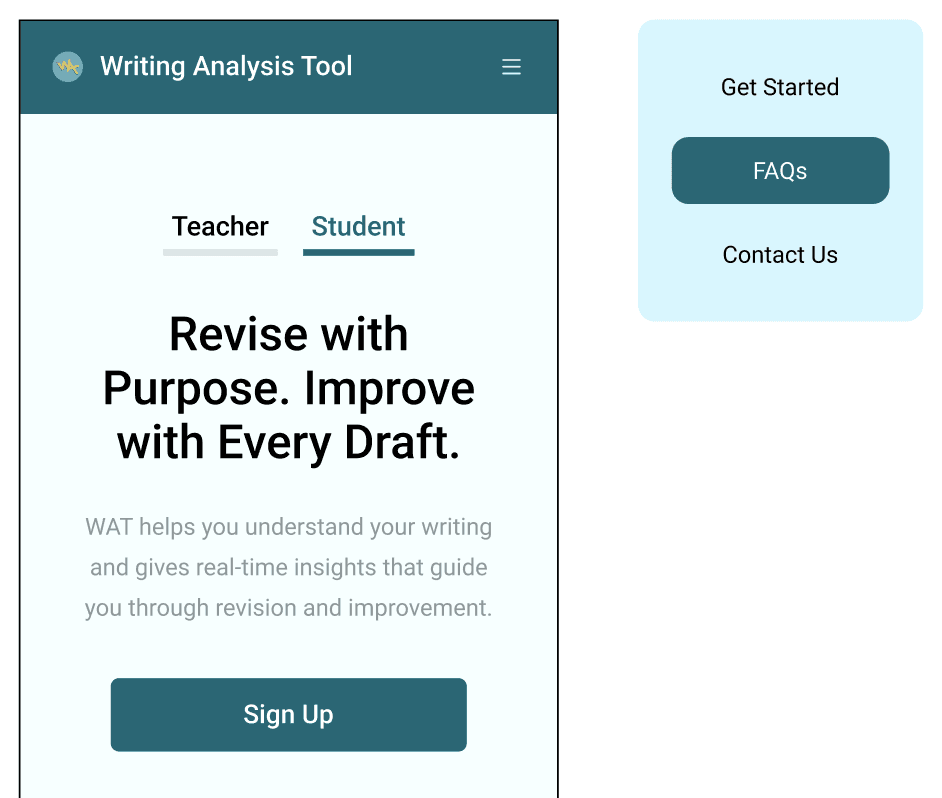
Phone navbar collapsed into a hamburger, with its menu open beside it

Figure 4. The phone navbar collapsed into a hamburger, with its menu open beside it.

How WAT works

The section opens with one line for teachers and students and a slot for a product video. Below it, three cards named Reflect and Revise, Teacher Tools and Progress Through Practice each explain one part of WAT in a few lines. On phones the cards stack in a single column.

WAT Researcher

WAT has a research sibling, WAT Researcher. It gets its own band below How WAT works, with a one-line pitch and separate links to the web app and the desktop app.

About

The About section explains who WAT serves, with a short paragraph each for students, teachers and researchers, then credits the teams at ASU’s Learning Engineering Institute and SoLET Lab and their partners at the University of Minnesota and Vanderbilt.

FAQ

The FAQ holds seven questions, from what WAT is and how to get started through to data privacy and cost, with a short answer under each.

Footer

The footer sends people to support through the LEI contact form, points researchers to WAT Researcher and credits the IES grant that funds WAT.

Built on the product’s style guide.

I built the page on WAT’s own color roles, type tokens and spacing scale, so it keeps the tool’s branding and hands the engineer values that already exist.
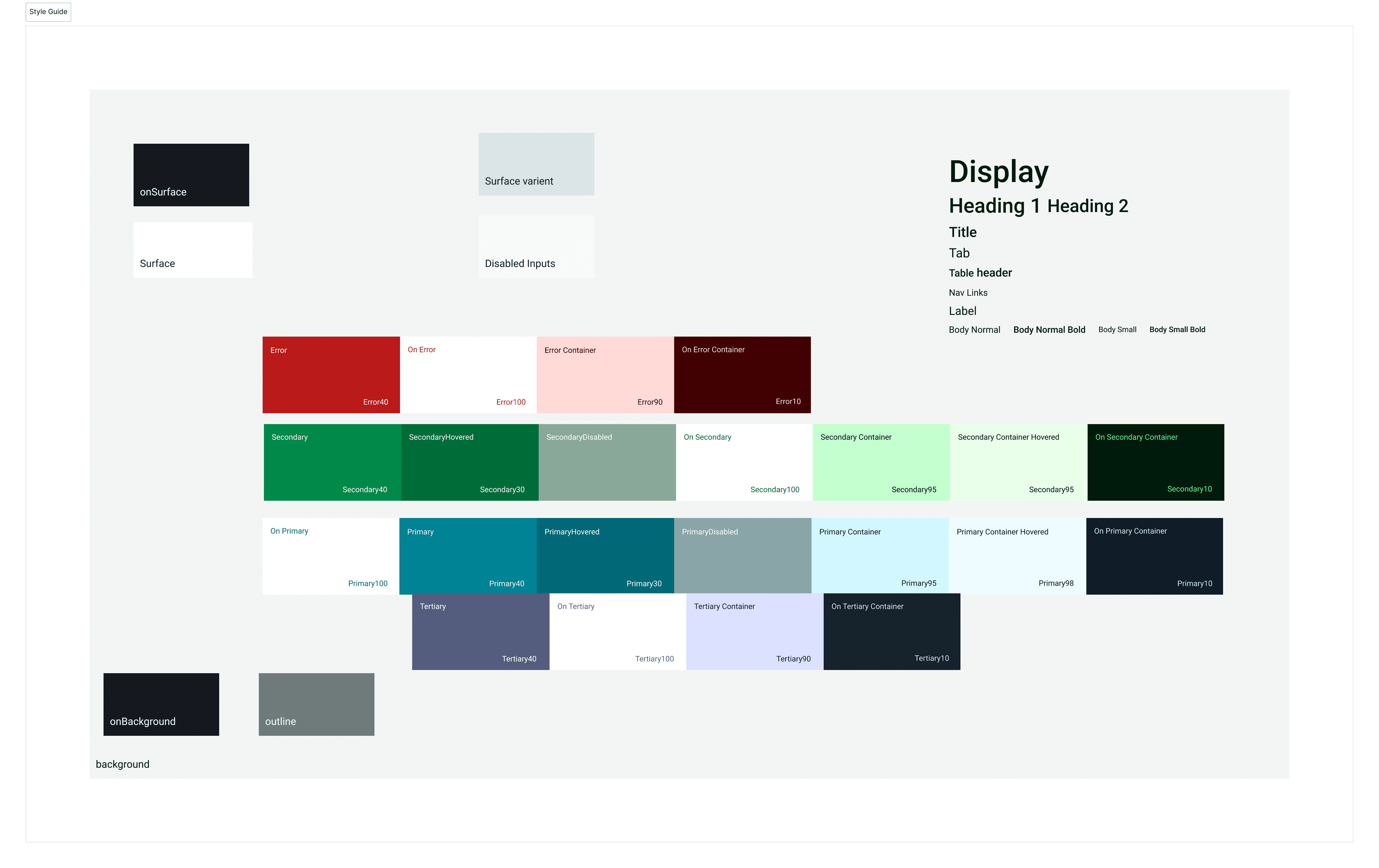
WAT style guide with color roles and the type scale

Figure 5. The style guide the landing page reuses: color roles and the type scale.

Clickable prototype.

I designed the desktop, tablet and phone layouts together, so the stacked cards, segmented tabs and collapsed menu were settled before handoff.

Project takeaways.
01
A split hero works when both tabs lead to the same action.
02
Settling responsive patterns early saved last-minute compromises.
03
A small style guide of tokens and components was enough to keep the build consistent.

Create a free website with Framer, the website builder loved by startups, designers and agencies.