Desktop research tool · Summer 2025

WAT Researcher is a desktop tool for large-scale writing analysis. I joined at alpha in summer 2025 and covered its UX end to end, including a stress test on 3,000+ synthetic essays. My usability study exposed a silent analysis failure the team hadn’t caught, and 13 fixes landed before launch.
TIMELINE
Jun to Aug 2025
METHOD
Remote unmoderated usability study
TOOLS
Google Sheets · Google Forms · ChatGPT
At a glance.
3,000+
synthetic, for the stress test
12
a 30 to 40 minute role-play
6
received the workbook
48
from 4 completed workbooks
7
from the notes column
13
including the 7 from the study
What WAT Researcher does.
WAT Researcher (Writing Analytics Tool) helps researchers analyze large collections of writing, such as student essays and academic text. It:
Takes in corpora (sets of texts)
Extracts 3,000+ linguistic features
Scores writing by genre, independent (persuasive) or source-based (dependent)

Figure 1. A finished analysis on the dashboard, with the scores preview beside it.
Alpha testing.
I joined at the alpha stage and used the tool the way a researcher would. I logged every issue I hit and sorted them into three groups.
UX issues
Replace the radio-button switch between folder mode and spreadsheet mode with tabs
Show the Open Project button as disabled at the start
Make the select-corpus table responsive
Remove the footer
Show the active tab in the nav bar
Swap checkboxes for radio buttons when selecting a corpus
Rename Browse to Select
Add tooltips for @textld and @text
Give the create-corpus modal a structured layout
Accessibility issues
The genre dropdown icon
Color contrast in the modal
Font size of table text
Space above the corpora modal
Functionality issues
Analysis failed in CSV and XLSX when there was no source corpus
Cases where the system failed silently or without helpful feedback
Missing tooltips
Then I moved into problem solving. I worked with the team to fix the issues and tested each fix again.

Figure 2. Load Corpus after the alpha fixes, with folder mode and spreadsheet mode as tabs.
Stress testing at scale.
After the alpha test, I expected researchers to work with large volumes of text. To stress test the tool, I generated 3,000+ essays with ChatGPT. Folder mode got .txt files and spreadsheet mode got CSV and XLSX spreadsheets. The set covered source-dependent and independent essays, plus mixed corpora.

Figure 3. The stress-test corpus, built for both input modes: .txt folders and CSV or XLSX sheets.
I wanted to know:
Does the tool still feel stable?
Does progress make sense on long runs?
Do new UX or performance issues appear only at scale?
I found that:
Only one analysis runs at a time
If a run stops, the data processed so far is lost
I added short notes in the interface so users know about both.

Figure 4. The progress dialog during an analysis, with the notes on keeping the app open and on saving results as it goes.
The usability study.
Internal testing wasn’t enough, so in August 2025 I ran an end-to-end usability study. I wrote a 12-task protocol as a 30 to 40 minute role-play that walks through the whole tool, from creating a project to reading results. Each task lists guiding steps and an expected outcome, and participants rated complexity and usability from 1 to 5. Every participant got a workbook, and a Google Form collected their feedback.
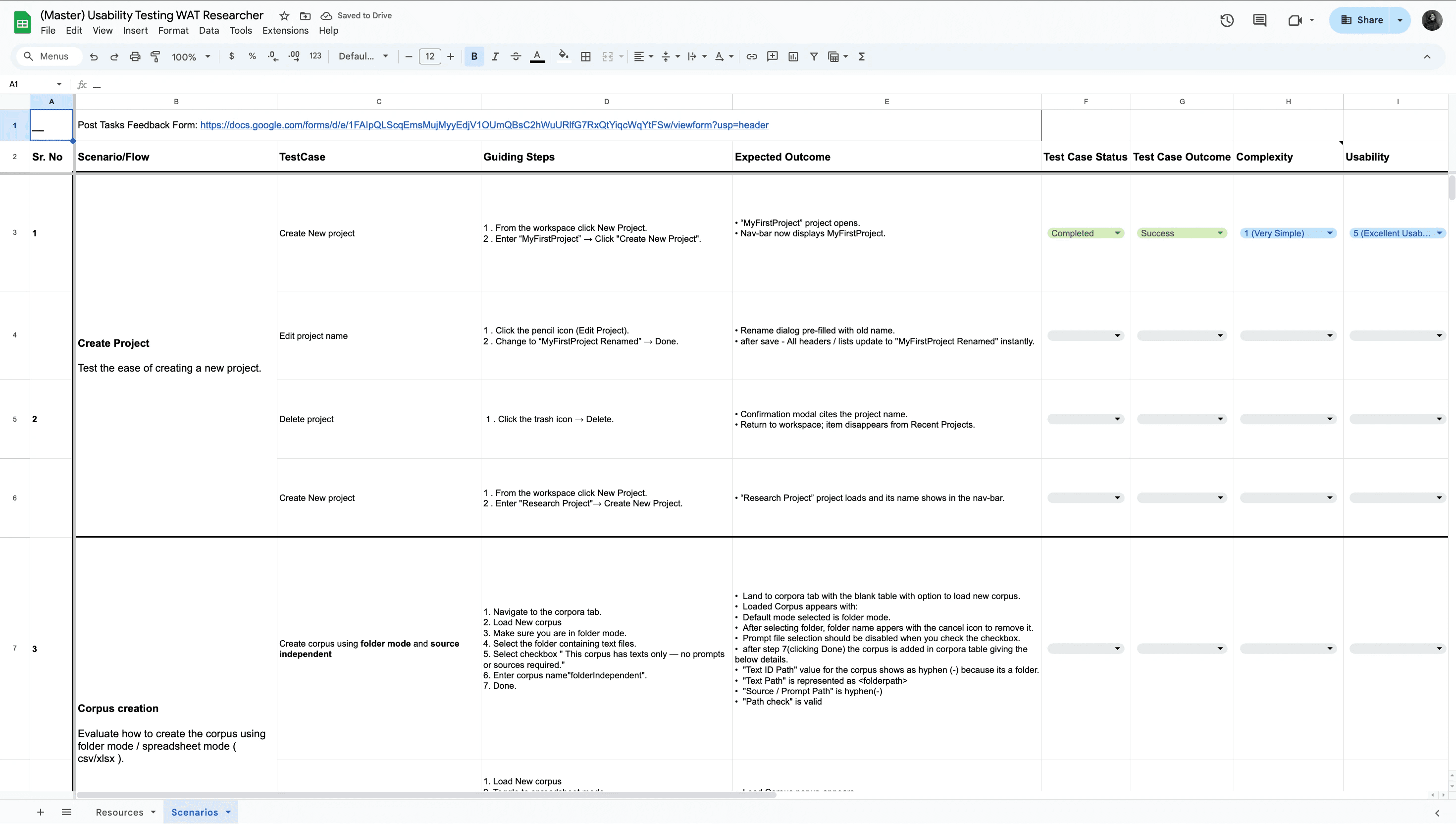
Figure 5. The usability test workbook. Each scenario lists its test cases with guiding steps and expected outcomes.
I emailed the workbook to 6 researchers. They ran it remotely on their own, with no moderator, and four of them completed every case, for 48 task attempts.
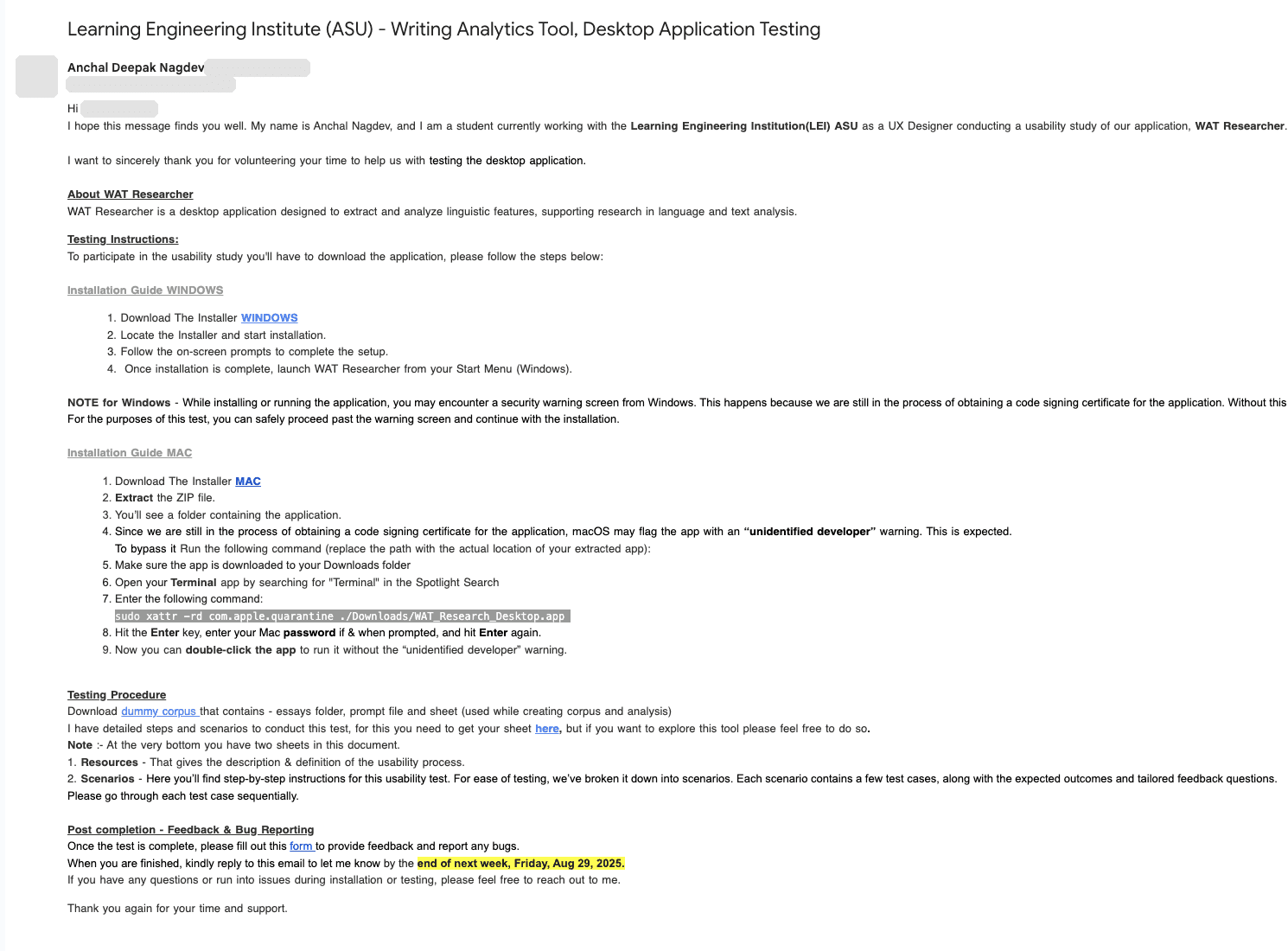
Figure 6. The invitation email (personal details hidden), with install steps for Windows and Mac and the testing procedure.
The failure the team hadn’t caught.
The most serious issue was a silent failure the team hadn’t caught. An analysis on a corpus with no source failed while the screen said completed.
Across 48 task attempts, 45 were clean. Usability averaged 4.9 out of 5, so the findings came from the notes column. The notes gave me seven issues, including:
Paste failing in a rename field
A preview showing only some of the selected columns
An analysis on a corpus with no source that failed while the screen said completed
A researcher could have trusted results that never ran. The team fixed all seven before the tool went out to researchers.
What changed
Technical labels like TAACO and TAASSC moved into the metrics step and the reference section.
The tool and the user guides follow one model: Project → Corpus → Analysis → Results.
The docs now say results are saved after each text.
Results.
I organized the findings and recommendations for the team. Engineering fixed the code defects, and I fixed the docs and copy. The seven study issues were part of 13 usability fixes, all resolved before launch.
Project takeaways.
Next case study
AI-X Framework, three research frameworks in one guided web app
Read the case study →

Anchal Nagdev